
Your booking page works the moment it's created. Customers can reach it from a link you send, a QR code on a flyer, or a calendar embedded right on your website.
Copy a booking link
There are two kinds of links:
- The page link, such as
https://acme.dayschedule.com, lists every public event, service and venue on the page. Copy it from the page header on the Resources page or from Pages. - An event link, such as
https://acme.dayschedule.com/strategy-call, opens one event directly. Copy it with Copy Link in the event editor, or the copy icon on the resource card.
Click the share icon on a resource card to open the share dialog. It has three tabs: Share Link with the link, Copy and Preview, Expirable Link for one-time links, and Embed. The Expirable Link tab also has a UTM Builder that adds utm_source, utm_medium, utm_campaign and other parameters to the link, so each booking shows which campaign it came from under Tracking Details in the booking details.
Good places for your link: your email signature, LinkedIn profile, Google Business Profile, Instagram bio and WhatsApp replies. See how to share your bookable appointment link.
Make a QR code
The QR icon next to Embed on each page header creates a QR code of the page link for posters, business cards and reception desks. The free event QR code generator makes one for any link.
Embed the booking calendar on your website
- Click Embed in the event editor, on the page header in Resources, or in the Pages list.
- Adjust the Height (px) if needed. The default is 700.
- Click Copy code.
- Paste the code into an HTML or custom code block on your website and publish the page.
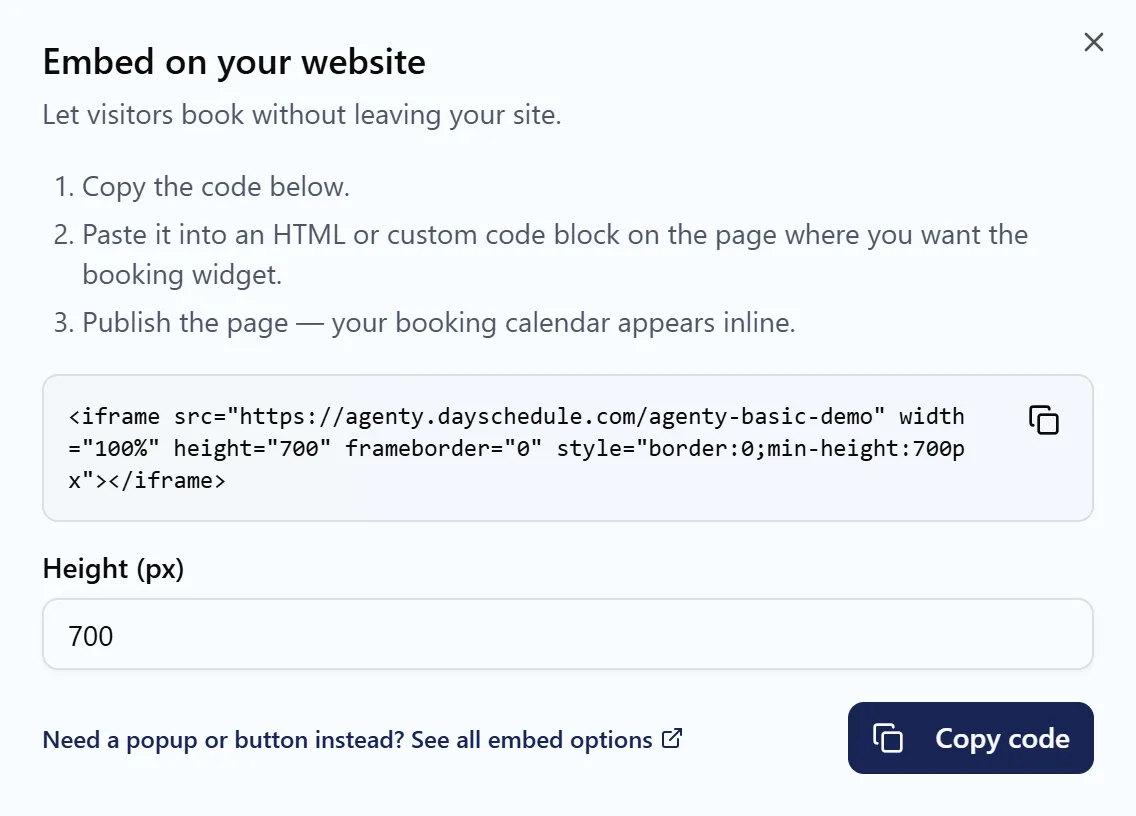
The code is an iframe, so it works on any website builder that accepts HTML:
<iframe src="https://acme.dayschedule.com/strategy-call" width="100%" height="700" frameborder="0" style="border:0;min-height:700px"></iframe>
Embed the page link to show all your events, or an event link to show one event's calendar.
Popup, button and framework widgets
For a booking button that opens a popup, or for frameworks and site builders, use the widget page or one of these guides:
| Platform | Guide |
|---|---|
| WordPress | WordPress plugin |
| HTML and JavaScript | JavaScript widget |
| React | React |
| Next.js | Next.js |
| Vue.js | Vue.js |
| Angular | Angular |
| Nuxt.js | Nuxt.js |
| FlexiFunnels | FlexiFunnels |
The embedded widgets overview compares inline, popup and button embeds.
Share a link that works only once
For VIP clients or invite-only sessions, send a link that expires after one booking or on a date. See Expirable booking links.